> ## Documentation Index
> Fetch the complete documentation index at: https://docs.garden.finance/llms.txt
> Use this file to discover all available pages before exploring further.
# How to swap any EVM asset to BTC
> Step-by-step guide to swapping Wrapped Bitcoin (WBTC) back to native Bitcoin using Garden Finance
Convert your Wrapped Bitcoin (WBTC) back to native Bitcoin. This process "unwraps" your WBTC from Ethereum or Arbitrum networks and returns it as native Bitcoin.
This guide covers swapping **Wrapped Bitcoin (WBTC)** to **Bitcoin (BTC)**. The process typically completes in under 30 seconds.
## What You'll Need
* **EVM Wallet**: MetaMask, Coinbase Wallet, or other EVM-compatible wallet with WBTC
* **Bitcoin Wallet**: Optional (you can provide a Bitcoin address manually)
* WBTC tokens on Ethereum or Arbitrum
* Small amount of ETH or ARB for gas fees to approve the transaction
## Method 1: With Bitcoin Wallet Connected (Recommended)
This method automatically handles the Bitcoin address for receiving your unwrapped Bitcoin.
1. Visit [Garden Finance](https://app.garden.finance)
2. Click **Connect Wallet** and connect your **EVM wallet** containing WBTC
3. Click **Connect Bitcoin Wallet** and connect your Bitcoin wallet
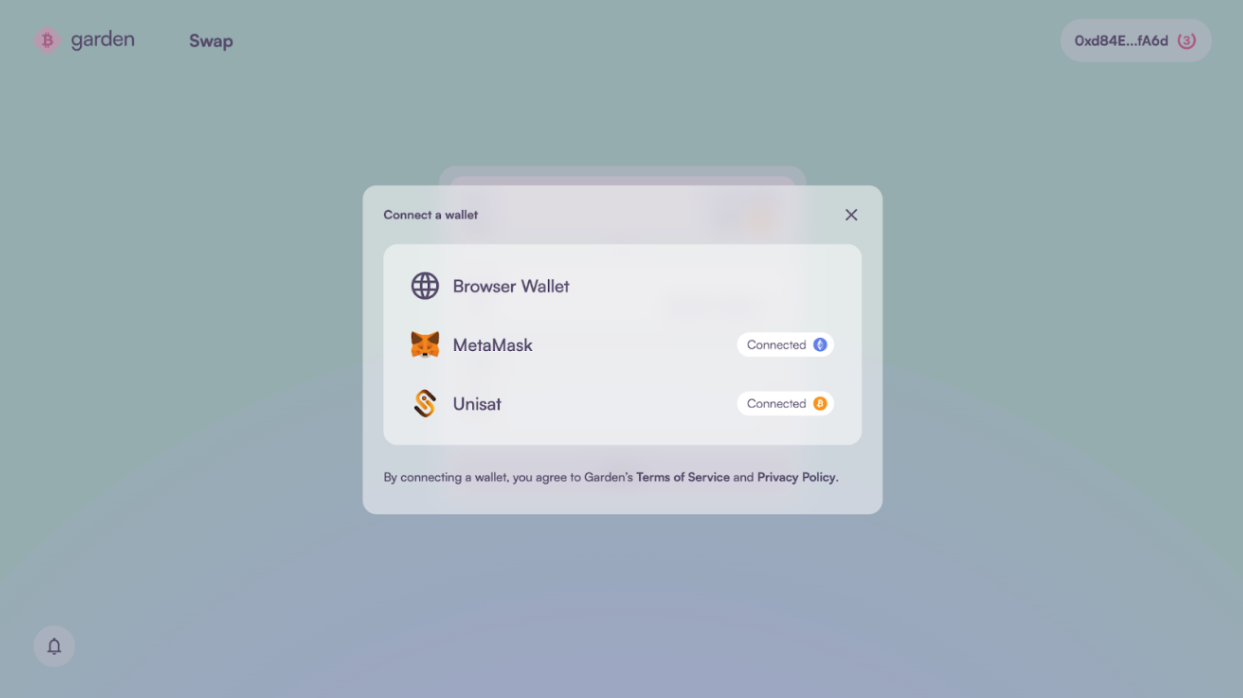 1. In the **Send** section, select **WBTC** and choose the network where your WBTC is located:
* **Ethereum**: If your WBTC is on Ethereum mainnet
* **Arbitrum**: If your WBTC is on Arbitrum
2. In the **Receive** section, select **Bitcoin (BTC)**
3. Enter the amount of WBTC you want to convert to BTC
1. In the **Send** section, select **WBTC** and choose the network where your WBTC is located:
* **Ethereum**: If your WBTC is on Ethereum mainnet
* **Arbitrum**: If your WBTC is on Arbitrum
2. In the **Receive** section, select **Bitcoin (BTC)**
3. Enter the amount of WBTC you want to convert to BTC
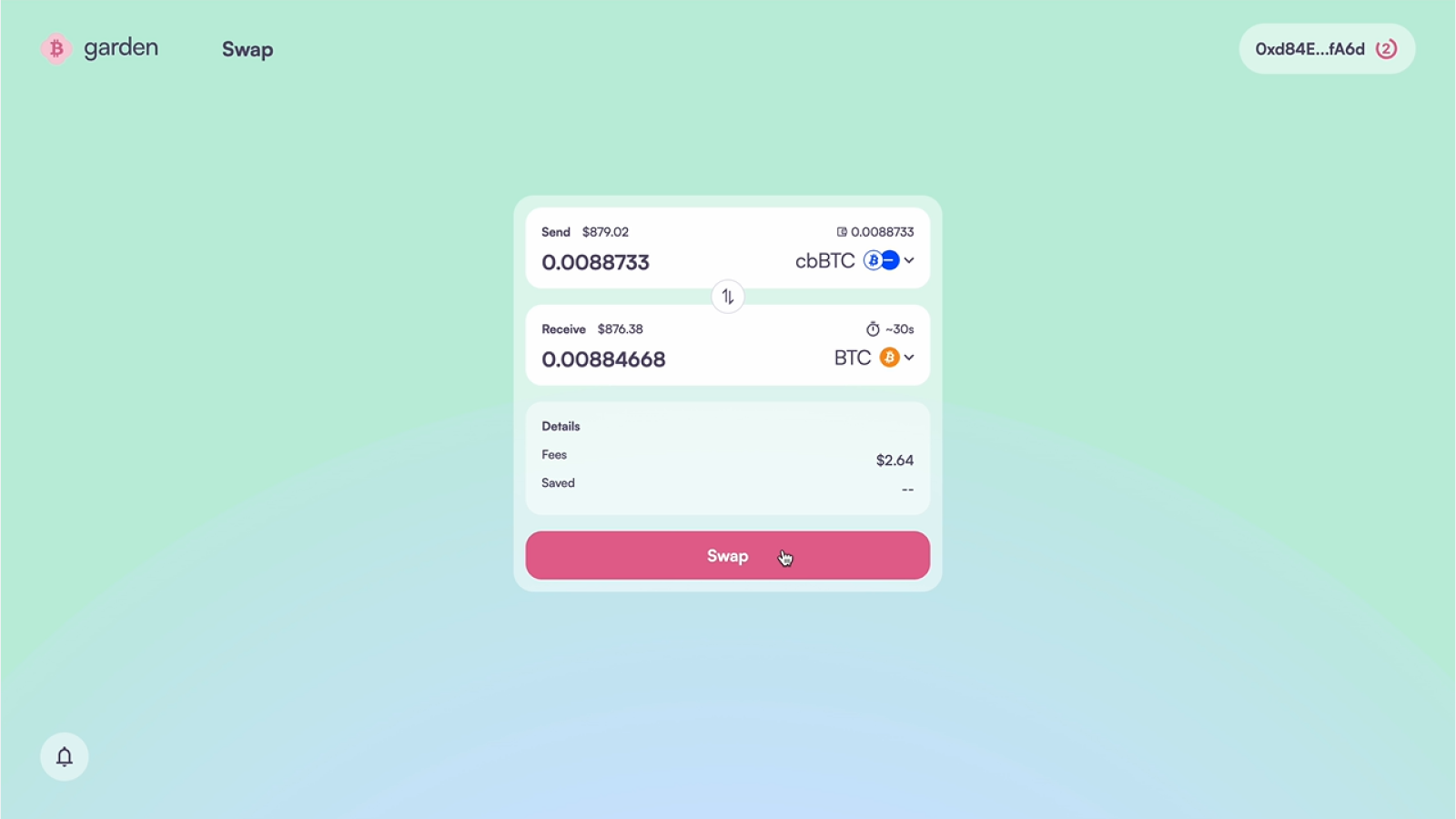 1. Review the conversion details:
* **Exchange rate**: Current WBTC to BTC rate (should be close to 1:1)
* **Network fees**: Gas fees for the EVM transaction
* **Garden fees**: Protocol fees for the swap
* **Receiving address**: Your connected Bitcoin wallet address
2. Click **Swap** when ready to proceed
1. Your EVM wallet will prompt you to approve the WBTC transfer
2. Confirm the transaction and pay the gas fees
3. Wait for the transaction to be confirmed on the blockchain
1. Review the conversion details:
* **Exchange rate**: Current WBTC to BTC rate (should be close to 1:1)
* **Network fees**: Gas fees for the EVM transaction
* **Garden fees**: Protocol fees for the swap
* **Receiving address**: Your connected Bitcoin wallet address
2. Click **Swap** when ready to proceed
1. Your EVM wallet will prompt you to approve the WBTC transfer
2. Confirm the transaction and pay the gas fees
3. Wait for the transaction to be confirmed on the blockchain
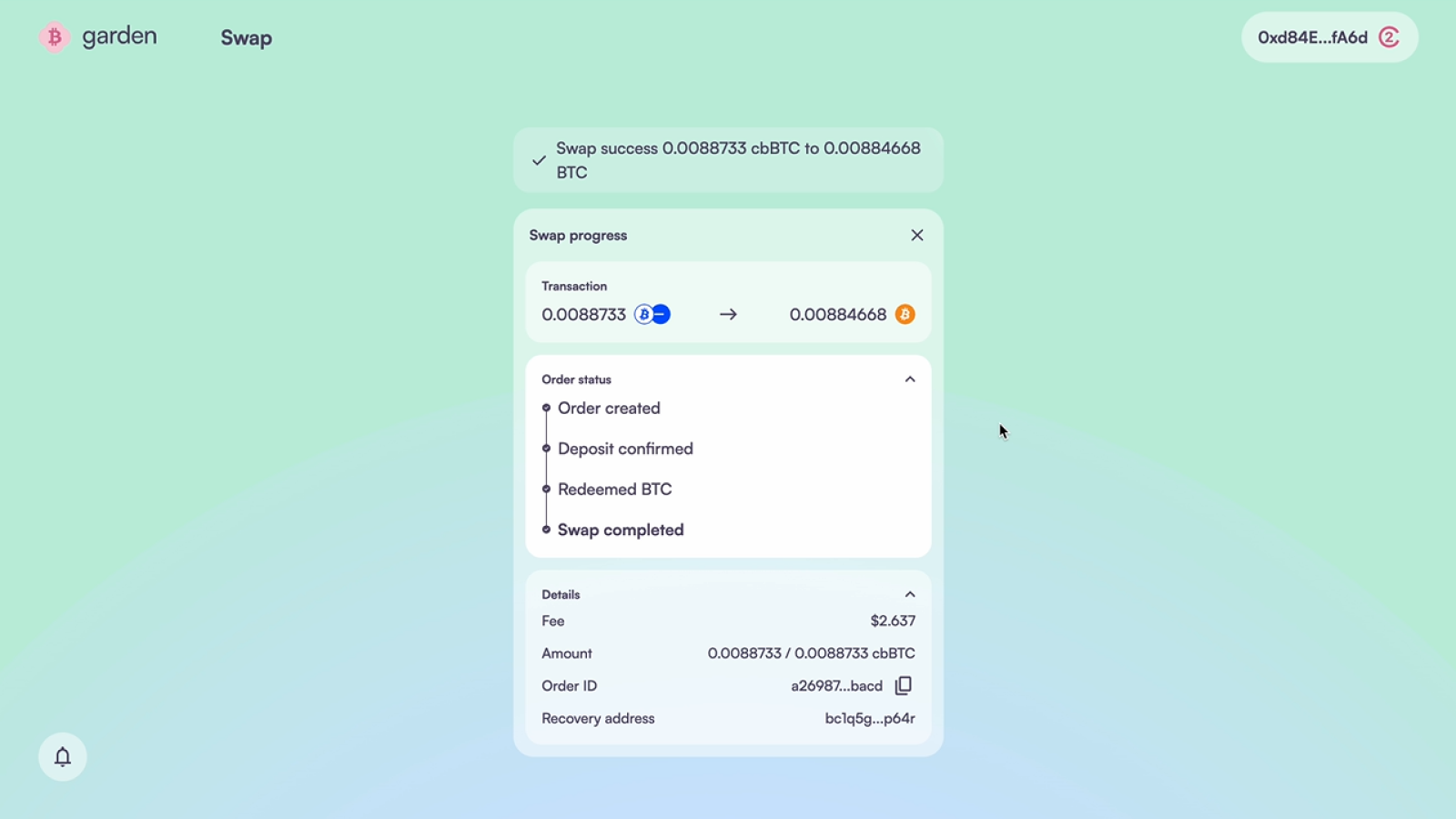
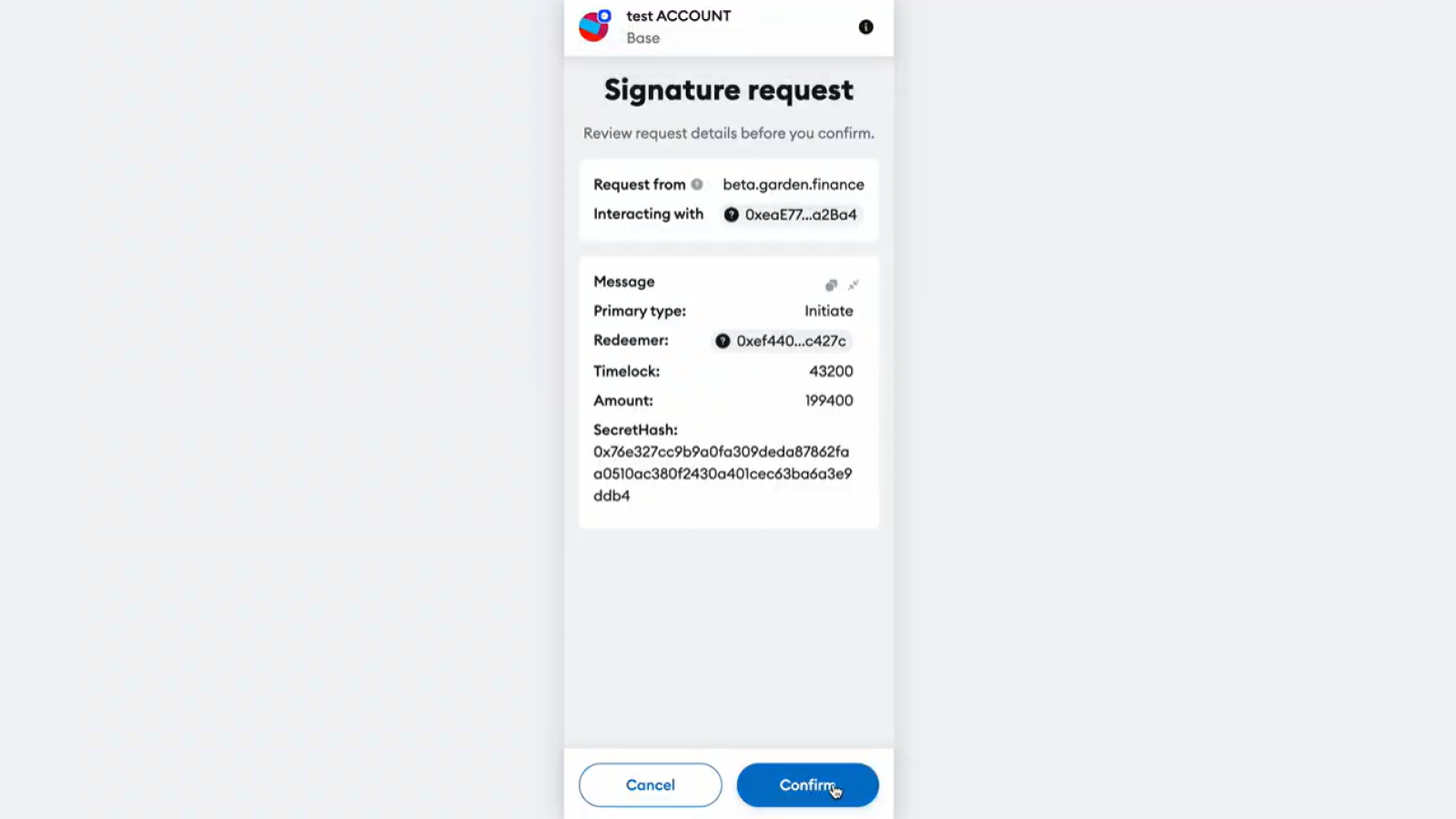 Monitor the swap progress. Once complete, you'll receive native Bitcoin in your connected Bitcoin wallet.
 ## Method 2: Manual Bitcoin Address
If you prefer not to connect your Bitcoin wallet, you can provide a Bitcoin address manually.
1. Visit [Garden Finance](https://app.garden.finance)
2. Connect your **EVM wallet** containing WBTC
3. Skip connecting a Bitcoin wallet
1. In the **Receive** section, select **Bitcoin (BTC)**
2. Manually enter your **Bitcoin receiving address**
3. **Double-check this address** - incorrect addresses cannot be recovered
4. Ensure the address is from a wallet you control
1. Configure the swap amount and review details
2. Click **Swap** and approve the WBTC transaction in your EVM wallet
3. Wait for the transaction confirmation and swap completion
## Security & Safety
**Atomic Swaps**: Garden uses atomic swap technology, meaning the transaction either completes entirely or fails entirely. Your WBTC is never at risk of being lost without receiving Bitcoin.
**Address Verification**: Always double-check your Bitcoin receiving address. Garden cannot recover funds sent to incorrect addresses.
**Network Confirmation**: Bitcoin transactions require blockchain confirmations. While Garden's process is fast, final Bitcoin confirmation may take 10-60 minutes depending on network conditions.
## Fees and Costs
| Fee Type | Description | Typical Amount |
| ----------------------- | ------------------------------- | ---------------------------- |
| **Gas Fees** | EVM network transaction costs | Varies by network congestion |
| **Garden Protocol Fee** | Service fee for atomic swap | Small percentage |
| **Network Spread** | Market-based pricing difference | Usually minimal |
## Troubleshooting
### Transaction Pending
* **Check gas fees**: Ensure you've set adequate gas prices
* **Network congestion**: Wait for network conditions to improve
* **Wallet issues**: Try disconnecting and reconnecting wallets
### Incorrect Amount Received
* **Slippage**: Market prices may change during transaction
* **Fees**: Final amount reflects deducted fees
* **Contact support**: Join Discord for assistance if amounts seem incorrect
## After Your Swap
Once you receive your Bitcoin:
* **Verify Receipt**: Check that Bitcoin arrived in your specified wallet
* **Security**: Consider moving Bitcoin to cold storage if not actively trading
## Related Guides
Want to wrap Bitcoin again? Learn how to convert BTC back to WBTC
Move WBTC between different blockchain networks
## Need Help?
* **Questions**: Join our [Discord community](https://discord.gg/B7RczEFuJ5)
* **Technical Support**: Reach out for [support on Discord](https://discord.gg/B7RczEFuJ5)
## Method 2: Manual Bitcoin Address
If you prefer not to connect your Bitcoin wallet, you can provide a Bitcoin address manually.
1. Visit [Garden Finance](https://app.garden.finance)
2. Connect your **EVM wallet** containing WBTC
3. Skip connecting a Bitcoin wallet
1. In the **Receive** section, select **Bitcoin (BTC)**
2. Manually enter your **Bitcoin receiving address**
3. **Double-check this address** - incorrect addresses cannot be recovered
4. Ensure the address is from a wallet you control
1. Configure the swap amount and review details
2. Click **Swap** and approve the WBTC transaction in your EVM wallet
3. Wait for the transaction confirmation and swap completion
## Security & Safety
**Atomic Swaps**: Garden uses atomic swap technology, meaning the transaction either completes entirely or fails entirely. Your WBTC is never at risk of being lost without receiving Bitcoin.
**Address Verification**: Always double-check your Bitcoin receiving address. Garden cannot recover funds sent to incorrect addresses.
**Network Confirmation**: Bitcoin transactions require blockchain confirmations. While Garden's process is fast, final Bitcoin confirmation may take 10-60 minutes depending on network conditions.
## Fees and Costs
| Fee Type | Description | Typical Amount |
| ----------------------- | ------------------------------- | ---------------------------- |
| **Gas Fees** | EVM network transaction costs | Varies by network congestion |
| **Garden Protocol Fee** | Service fee for atomic swap | Small percentage |
| **Network Spread** | Market-based pricing difference | Usually minimal |
## Troubleshooting
### Transaction Pending
* **Check gas fees**: Ensure you've set adequate gas prices
* **Network congestion**: Wait for network conditions to improve
* **Wallet issues**: Try disconnecting and reconnecting wallets
### Incorrect Amount Received
* **Slippage**: Market prices may change during transaction
* **Fees**: Final amount reflects deducted fees
* **Contact support**: Join Discord for assistance if amounts seem incorrect
## After Your Swap
Once you receive your Bitcoin:
* **Verify Receipt**: Check that Bitcoin arrived in your specified wallet
* **Security**: Consider moving Bitcoin to cold storage if not actively trading
## Related Guides
Want to wrap Bitcoin again? Learn how to convert BTC back to WBTC
Move WBTC between different blockchain networks
## Need Help?
* **Questions**: Join our [Discord community](https://discord.gg/B7RczEFuJ5)
* **Technical Support**: Reach out for [support on Discord](https://discord.gg/B7RczEFuJ5)