> ## Documentation Index
> Fetch the complete documentation index at: https://docs.garden.finance/llms.txt
> Use this file to discover all available pages before exploring further.
# Bridge using Garden SDK
> Step-by-step guide to integrating Garden SDK for fetching quotes, executing swaps, and tracking them
If you are stuck at any part of the implementation, drop a message in our [Townhall](https://discord.gg/B7RczEFuJ5)—our dev team is ready to assist!
This cookbook provides a step-by-step guide to integrating Garden SDK for fetching quotes, executing swaps, and tracking them. It walks through building a simple cross-chain bridge in a Next.js environment, enabling seamless swaps between BTC (Bitcoin Testnet4) and WBTC (Ethereum Sepolia).
For a fully functional reference, check out the [Bridge](https://github.com/gardenfi/demo-app-nextjs), allowing you to see how these steps integrate into a working application.
## What you'll build
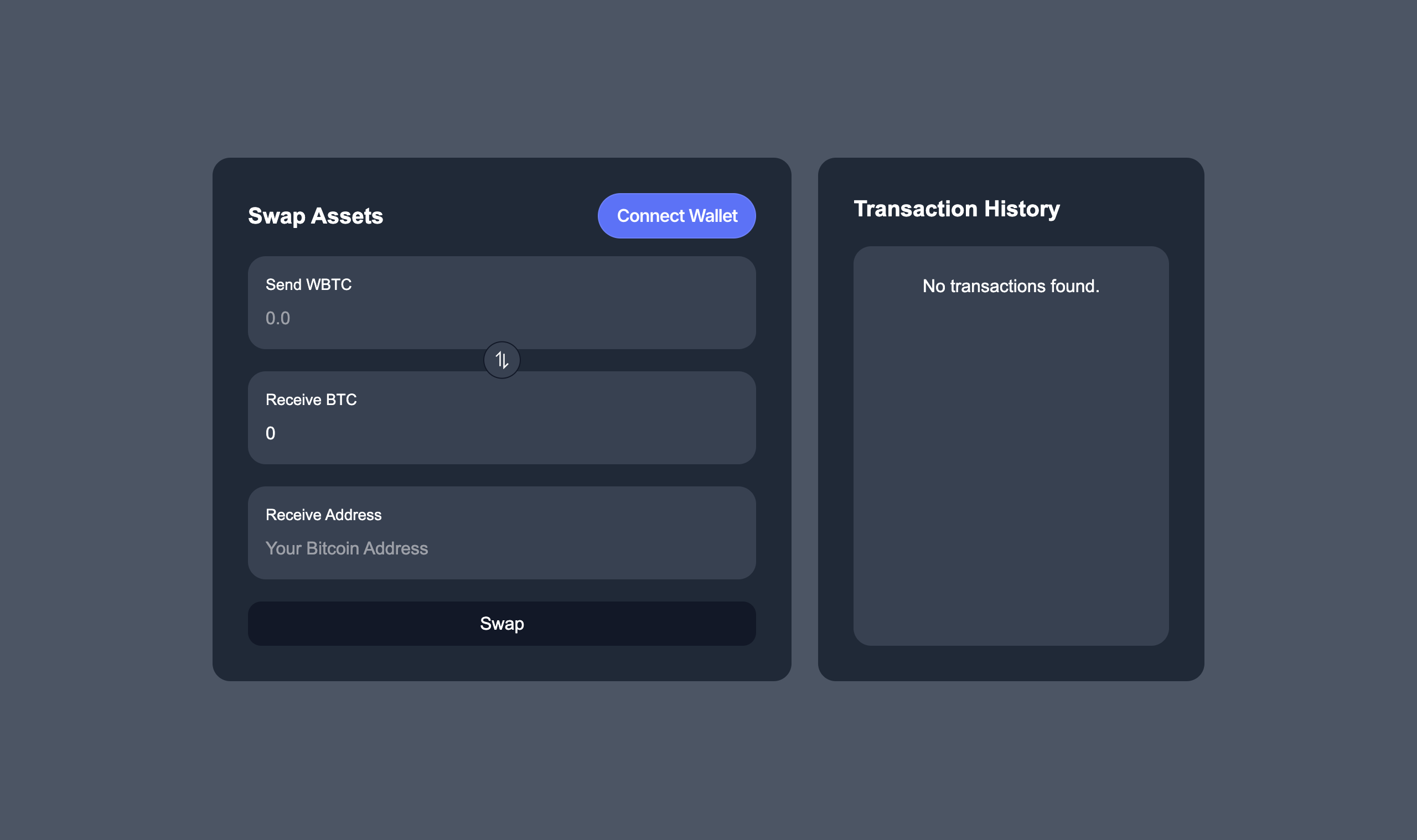 * **Cross-chain swaps**: Swap component for seamless cross-chain swaps using Garden SDK.
* **Swap history**: History component for keeping users informed about the status of their swaps.
## Setting up the SDK
The `GardenProvider` is the core of the SDK integration. It acts as a wrapper around your application, handling:
* **Session management**: Maintains active user sessions and transaction state.
* **Wallet connectivity**: Manages wallet connections, transaction signing, and approvals.
* **Environment configuration**: Switches between testnet and mainnet as needed.
Before interacting with the SDK, wrap your application with the `GardenProvider`. The provider requires `walletClient`, which is provided by `wagmi`. For this, you'll need to:
1. Get the `walletClient` using the `useWalletClient` hook.
2. Pass it to your `GardenProvider` configuration.
Here's how you set it up:
```tsx GardenProvider.tsx theme={null}
"use client";
import { GardenProvider } from "@gardenfi/react-hooks";
import { Environment } from "@gardenfi/utils";
import { useWalletClient } from "wagmi";
const getStorage = (): Storage => {
if (typeof window !== "undefined") {
return localStorage;
}
return {
getItem: () => null,
setItem: () => {},
removeItem: () => {},
clear: () => {},
length: 0,
key: () => null,
};
};
function GardenProviderWrapper({ children }: { children: React.ReactNode }) {
const { data: walletClient } = useWalletClient();
return (
{ children }
);
}
export default GardenProviderWrapper;
```
## Fetching quotes
Now that you have your `walletClient`, you can use it to initialize the `GardenProvider`. Before diving into swap, your app needs to fetch real-time quotes for their swap params `fromAsset`, `toAsset`, `amount`.
The `getQuote` hook from Garden SDK provides real-time USD values and exchange rates for any two [supported assets](/developers/supported-chains). You'll need to provide:
* `fromAsset`: The token you want to swap from.
* `toAsset`: The token you want to receive.
* `amount`: The amount you want to swap.
* `isExactOut`: Whether you're specifying the input or output amount.
Here's how you implement:
```tsx SwapComponent.tsx theme={null}
import { useGarden } from "@gardenfi/react-hooks";
import BigNumber from "bignumber.js";
const SwapComponent = () => {
const { getQuote } = useGarden();
const { swapParams } = swapStore();
const fetchQuote = async (amount: string) => {
if (!getQuote) return;
const amountInDecimals = new BigNumber(amount).multipliedBy(
10 ** swapParams.fromAsset.decimals
);
const quote = await getQuote({
fromAsset: swapParams.fromAsset,
toAsset: swapParams.toAsset,
amount: amountInDecimals.toNumber(),
isExactOut: false,
});
};
};
```
```ts SwapStore.ts theme={null}
import { SupportedAssets } from "@gardenfi/orderbook";
import { SwapParams } from "@gardenfi/core";
import { create } from "zustand";
interface SwapState {
swapParams: SwapParams;
setSwapParams: (params: Partial) => void;
}
export const swapStore = create((set) => ({
swapParams: {
fromAsset: SupportedAssets.testnet.ethereum_sepolia_WBTC,
toAsset: SupportedAssets.testnet.bitcoin_testnet_BTC,
sendAmount: "0",
receiveAmount: "0",
additionalData: { strategyId: "" },
},
setSwapParams: (params) =>
set((state) => ({
swapParams: { ...state.swapParams, ...params },
})),
}));
```
## Executing swap
Now that you have the quotes, it's time to execute the swap. Garden SDK provides the `swapAndInitiate` hook that handles the entire swap process for you.
Here's what it does:
1. Creates your swap order.
2. Waits for it to be matched with the [solver](/home/fundamentals/core-concepts/solvers).
3. Automatically initiates the swap if you're on a smart contract chain.
You'll need to provide the swap parameters (including the quote details you got earlier). The hook will return either a matched order or an error message if something goes wrong.
Here's how you can implement this:
```tsx TokenSwap.tsx theme={null}
import { useGarden } from "@gardenfi/react-hooks";
const TokenSwap = () => {
const { swapAndInitiate } = useGarden();
// We get the `strategyId` and `receiveAmount` from the quote response.
const performSwap = async (strategyId: string, receiveAmount: string) => {
const response = await swapAndInitiate({
fromAsset: swapParams.fromAsset,
toAsset: swapParams.toAsset,
sendAmount,
receiveAmount,
additionalData: {
btcAddress,
strategyId,
},
});
console.log(response);
return response;
};
};
```
## Fetching order status
Your swap is now initiated, but what's happening with your order? You can keep your users informed by tracking the order status right in your app.
The Garden SDK simplifies this with the `ParseOrderStatus` function, which determines the order's current state. By checking block numbers on both chains, it can identify if the order is:
* `Expired` - The user's swap has expired, and they have to refund their funds.
* `Initiated` - User initiated, waiting for counterparty to initiate.
* `Redeemed` - User redeemed, counterparty has to redeem.
* `Refunded` - User refunded.
Here's how you can implement this status tracking:
```tsx OrderStatusParser.tsx theme={null}
import { ParseOrderStatus } from "@gardenfi/core";
const OrderStatusParser = () => {
const status = ParseOrderStatus(
order.val,
blockNumbers.val[order.val.source_swap.chain],
blockNumbers.val[order.val.destination_swap.chain],
);
console.log('Status:', status);
};
```
You have now everything needed to build a simple swap application using the Garden SDK!
## Next steps
By following this cookbook, you've implemented the core functionalities of a cross-chain application using Garden SDK. If you are interested in building further, consider implementing:
* **Robust error handling** to manage API failures and network disruptions gracefully.
* **Notifications or status updates** to keep users informed on swap progress and completion.
* **Expanded asset support** to extend swap functionality across more chains and tokens.
* **UI/UX improvements** such as swap progress indicators.
* **Cross-chain swaps**: Swap component for seamless cross-chain swaps using Garden SDK.
* **Swap history**: History component for keeping users informed about the status of their swaps.
## Setting up the SDK
The `GardenProvider` is the core of the SDK integration. It acts as a wrapper around your application, handling:
* **Session management**: Maintains active user sessions and transaction state.
* **Wallet connectivity**: Manages wallet connections, transaction signing, and approvals.
* **Environment configuration**: Switches between testnet and mainnet as needed.
Before interacting with the SDK, wrap your application with the `GardenProvider`. The provider requires `walletClient`, which is provided by `wagmi`. For this, you'll need to:
1. Get the `walletClient` using the `useWalletClient` hook.
2. Pass it to your `GardenProvider` configuration.
Here's how you set it up:
```tsx GardenProvider.tsx theme={null}
"use client";
import { GardenProvider } from "@gardenfi/react-hooks";
import { Environment } from "@gardenfi/utils";
import { useWalletClient } from "wagmi";
const getStorage = (): Storage => {
if (typeof window !== "undefined") {
return localStorage;
}
return {
getItem: () => null,
setItem: () => {},
removeItem: () => {},
clear: () => {},
length: 0,
key: () => null,
};
};
function GardenProviderWrapper({ children }: { children: React.ReactNode }) {
const { data: walletClient } = useWalletClient();
return (
{ children }
);
}
export default GardenProviderWrapper;
```
## Fetching quotes
Now that you have your `walletClient`, you can use it to initialize the `GardenProvider`. Before diving into swap, your app needs to fetch real-time quotes for their swap params `fromAsset`, `toAsset`, `amount`.
The `getQuote` hook from Garden SDK provides real-time USD values and exchange rates for any two [supported assets](/developers/supported-chains). You'll need to provide:
* `fromAsset`: The token you want to swap from.
* `toAsset`: The token you want to receive.
* `amount`: The amount you want to swap.
* `isExactOut`: Whether you're specifying the input or output amount.
Here's how you implement:
```tsx SwapComponent.tsx theme={null}
import { useGarden } from "@gardenfi/react-hooks";
import BigNumber from "bignumber.js";
const SwapComponent = () => {
const { getQuote } = useGarden();
const { swapParams } = swapStore();
const fetchQuote = async (amount: string) => {
if (!getQuote) return;
const amountInDecimals = new BigNumber(amount).multipliedBy(
10 ** swapParams.fromAsset.decimals
);
const quote = await getQuote({
fromAsset: swapParams.fromAsset,
toAsset: swapParams.toAsset,
amount: amountInDecimals.toNumber(),
isExactOut: false,
});
};
};
```
```ts SwapStore.ts theme={null}
import { SupportedAssets } from "@gardenfi/orderbook";
import { SwapParams } from "@gardenfi/core";
import { create } from "zustand";
interface SwapState {
swapParams: SwapParams;
setSwapParams: (params: Partial) => void;
}
export const swapStore = create((set) => ({
swapParams: {
fromAsset: SupportedAssets.testnet.ethereum_sepolia_WBTC,
toAsset: SupportedAssets.testnet.bitcoin_testnet_BTC,
sendAmount: "0",
receiveAmount: "0",
additionalData: { strategyId: "" },
},
setSwapParams: (params) =>
set((state) => ({
swapParams: { ...state.swapParams, ...params },
})),
}));
```
## Executing swap
Now that you have the quotes, it's time to execute the swap. Garden SDK provides the `swapAndInitiate` hook that handles the entire swap process for you.
Here's what it does:
1. Creates your swap order.
2. Waits for it to be matched with the [solver](/home/fundamentals/core-concepts/solvers).
3. Automatically initiates the swap if you're on a smart contract chain.
You'll need to provide the swap parameters (including the quote details you got earlier). The hook will return either a matched order or an error message if something goes wrong.
Here's how you can implement this:
```tsx TokenSwap.tsx theme={null}
import { useGarden } from "@gardenfi/react-hooks";
const TokenSwap = () => {
const { swapAndInitiate } = useGarden();
// We get the `strategyId` and `receiveAmount` from the quote response.
const performSwap = async (strategyId: string, receiveAmount: string) => {
const response = await swapAndInitiate({
fromAsset: swapParams.fromAsset,
toAsset: swapParams.toAsset,
sendAmount,
receiveAmount,
additionalData: {
btcAddress,
strategyId,
},
});
console.log(response);
return response;
};
};
```
## Fetching order status
Your swap is now initiated, but what's happening with your order? You can keep your users informed by tracking the order status right in your app.
The Garden SDK simplifies this with the `ParseOrderStatus` function, which determines the order's current state. By checking block numbers on both chains, it can identify if the order is:
* `Expired` - The user's swap has expired, and they have to refund their funds.
* `Initiated` - User initiated, waiting for counterparty to initiate.
* `Redeemed` - User redeemed, counterparty has to redeem.
* `Refunded` - User refunded.
Here's how you can implement this status tracking:
```tsx OrderStatusParser.tsx theme={null}
import { ParseOrderStatus } from "@gardenfi/core";
const OrderStatusParser = () => {
const status = ParseOrderStatus(
order.val,
blockNumbers.val[order.val.source_swap.chain],
blockNumbers.val[order.val.destination_swap.chain],
);
console.log('Status:', status);
};
```
You have now everything needed to build a simple swap application using the Garden SDK!
## Next steps
By following this cookbook, you've implemented the core functionalities of a cross-chain application using Garden SDK. If you are interested in building further, consider implementing:
* **Robust error handling** to manage API failures and network disruptions gracefully.
* **Notifications or status updates** to keep users informed on swap progress and completion.
* **Expanded asset support** to extend swap functionality across more chains and tokens.
* **UI/UX improvements** such as swap progress indicators.